
Best practices for dimensions
Designing a dimension means choosing the right levels and the right granularity for your analysis.
Use this page when you design or refactor a dimension. The Requirements section lists what Valsight enforces; Design principles covers what makes the dimension easier to maintain.
Requirements
Dimensions must be MECE
Each level of a hierarchy must be mutually exclusive and collectively exhaustive (MECE):
Mutually exclusive: every data point belongs to exactly one entry on a given level; no value can appear under two parents at the same time.
Collectively exhaustive: every data point belongs to some entry on the level; no value can be left without a parent.
If a value cannot be cleanly placed under one of your existing parents, you have either defined the level wrong or you need a "catch-all" parent to absorb the remainder.
Example: a regional hierarchy
The Location dimension has three levels: Total, Region, Country. The Region level groups countries into EMEA, America, and Rest of World, with GER and FRA under EMEA, USA under America, and JPN, IND, AUS under Rest of World.
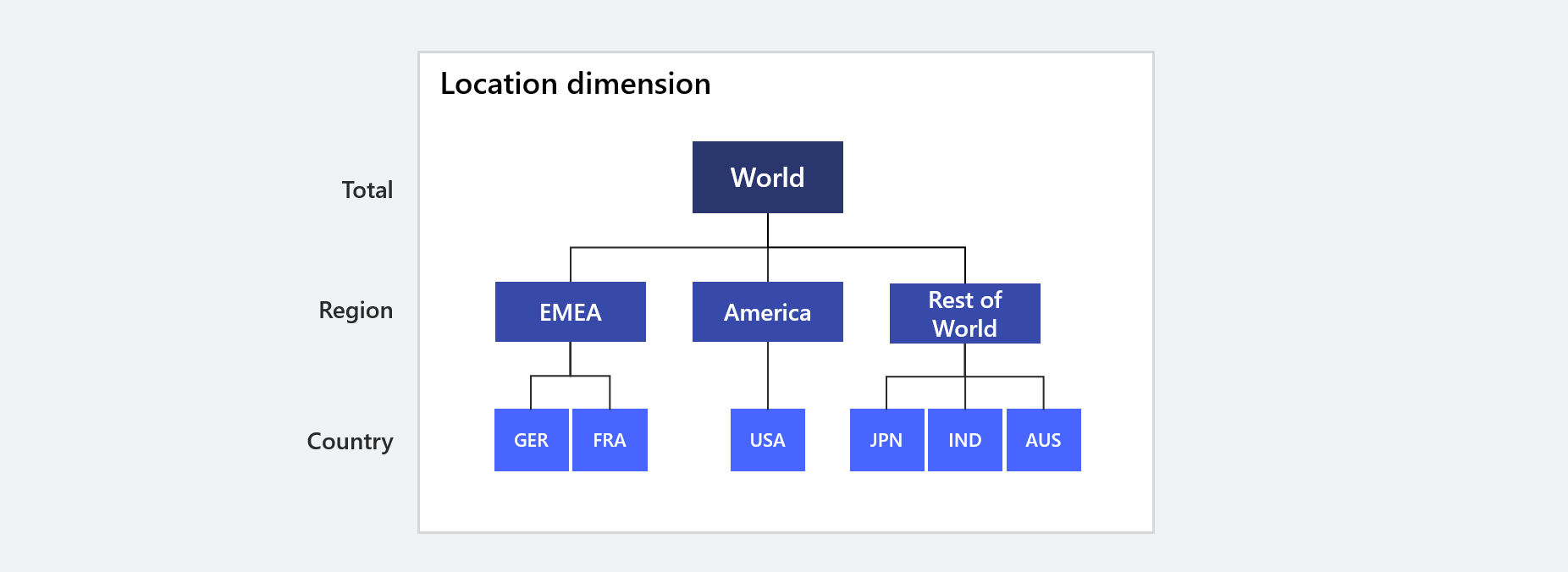
This hierarchy is MECE:
Mutually exclusive: each country has exactly one Region parent. If GER were listed under both EMEA and Rest of World, that would be a mutual exclusivity violation.
Collectively exhaustive: every country has a home. If JPN, IND, and AUS were left out of the hierarchy, their data would appear missing. The Rest of World bucket is the catch-all that keeps every country represented at the Region level.
Level names must be unique across the project
Two dimensions in the same project cannot share a level name. Valsight enforces this in the software and on Excel upload; an uploaded column that reuses a level name from another dimension produces a validation error (see Excel upload feedback messages).
Design principles
These are recommendations, not enforced rules. Following them makes a dimension easier to maintain and reason about.
Don't model finer than you need. Excessive granularity inflates cube sizes, slows calculations, and adds maintenance burden for no analytical gain. Decide the level of detail your analysis actually requires before designing the dimension.
Pick the lowest level first. Once you have settled on the right level of detail, design the dimension from that level upward. Reverse-designing from the top usually leaves gaps.
Name levels by what they contain, not how they roll up. "Country" is better than "Region detail".
Avoid placeholder values like "Other" or "Unknown" on a granular level. They usually signal that the upper levels are not collectively exhaustive (a MECE violation). Add a real catch-all parent instead.
Limitations to keep in mind
Each dimension must be updated separately. You cannot update multiple dimensions in a single Excel upload.
When updating via Excel, the full structure must be supplied. Partial uploads are not supported.
Levels used as level links to other dimensions cannot be removed via Excel. Remove the link first.
Related sections
How dimensions work: the concept and vocabulary
Creating dimensions: setting up a dimension end to end
Excel upload feedback messages: validation messages that enforce these requirements