
Models
Submodels help structure large models by splitting logic into smaller, focused parts. They make complex models easier to understand, maintain, and work on together.
In Valsight, submodels are not isolated fragments. They remain fully connected and together form one coherent business model.
When to use it
When a model becomes large or hard to reason about
When different parts of the logic serve different purposes
Best practice: the Valsight “fish” structure
A recommended way to structure models is the Valsight fish, which typically spans up to six levels:
500_Tail: Data input models
400-20X_Mid-sections: Market logic, sales volumes, production costs, OPEX
100_Head: P&L and KPI models
Each level represents a clear business responsibility and can be implemented as one or multiple submodels.
Submodels can be configured independently, depending on complexity and team needs.
This structure improves overview, supports scaling, and makes model logic easier to navigate.
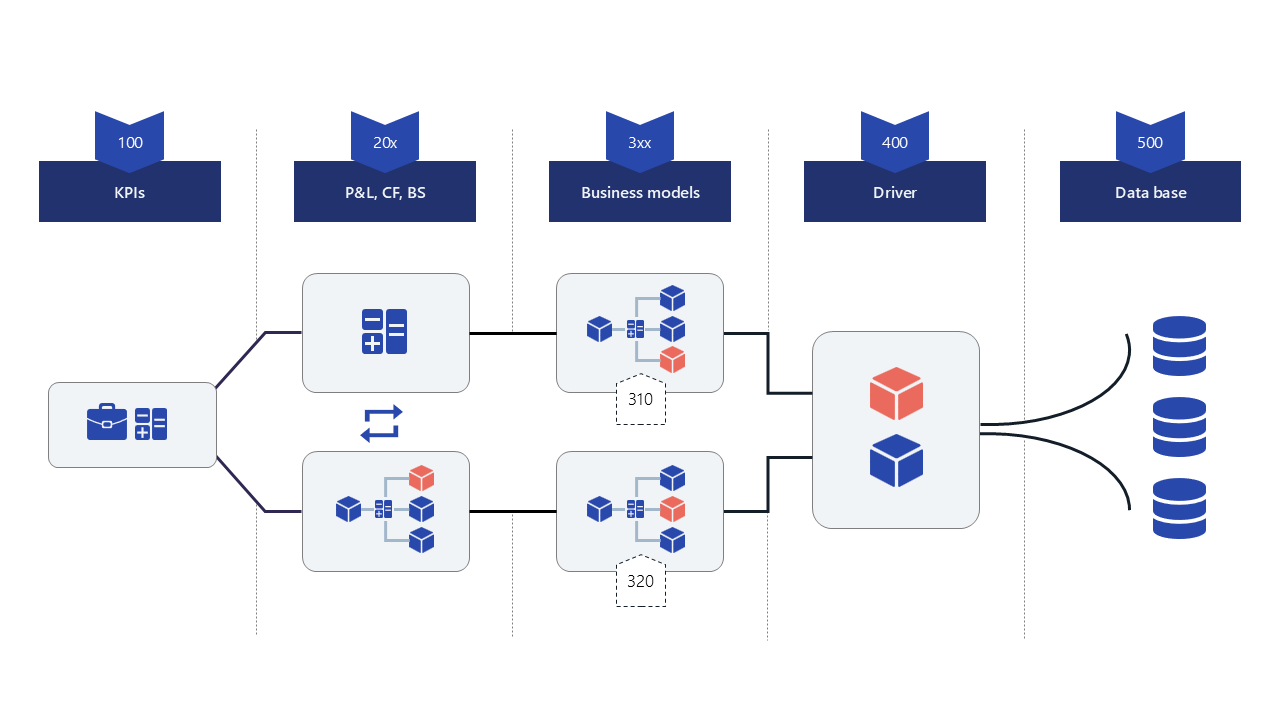
Node availability & model flow
Nodes are available for connections based on their position in the fish flow:
Nodes can be used within their own model
Nodes can be used in any model that comes after them in the flow
For example:
Nodes from Sales are available in P&L and KPIs
Nodes from KPIs are not available in Sales or P&L
To support tighter coordination, submodels can also have two-way relationships (e.g. Sales ↔ Market Model).
This allows nodes from both models to be used across the connected models.
Access & permissions
Submodels allow granular access control across the model structure.
Permissions can be set so that a user:
Has access only to specific submodels (e.g. OPEX)
Automatically gains access to all preceding models in the flow
Cannot access other models on the same level or any subsequent models
This makes it possible to safely collaborate across teams while protecting sensitive logic.
FAQ
Do submodels affect results?
No. They only structure logic.
Can I add submodels later?
Yes. Submodels can be added at any time. What matters most is how responsibilities are separated, not how many submodels you create.
Are submodels required?
No. They are most useful for larger or collaborative models.
➡️ See the Submodels section in the FAQs for more questions.